Day 16 Task: Docker for DevOps Engineers
Understanding Docker fundamentals

Hi, I am Vibhuti Jain. A Devops Tools enthusiastic who keens on learning Devops tools and want to contribute my knowledge to build a community and collaborate with them. I have a acquired a knowledge of Linux, Shell Scripting, Python, Git, GitHub, AWS Cloud and ready to learn a lot more new Devops skills which help me build some real life project.
Docker
Docker is a software platform that allows you to build, test, and deploy applications quickly. Docker packages software into standardized units called containers that have everything the software needs to run, including libraries, system tools, code, and runtime. Using Docker, you can quickly deploy and scale applications into any environment and know your code will run.
Difference between Docker and Virtual Machine
1. Architecture:
Virtual Machines:
Hypervisor: VMs run on a hypervisor, which sits on top of the physical hardware and manages multiple VMs.
Guest OS: Each VM runs its own complete operating system (called a guest OS) on top of the host OS.
Resources: VMs are heavier because each one includes the entire OS, which requires significant memory and CPU resources.
Docker Containers:
Docker Engine: Docker containers run on the Docker engine, which sits on top of the host OS.
Shared OS: Containers share the host OS's kernel and do not require a full OS installation inside each container.
Resources: Containers are lighter because they share the host OS and use only the necessary libraries and binaries.
Architecture Of Docker
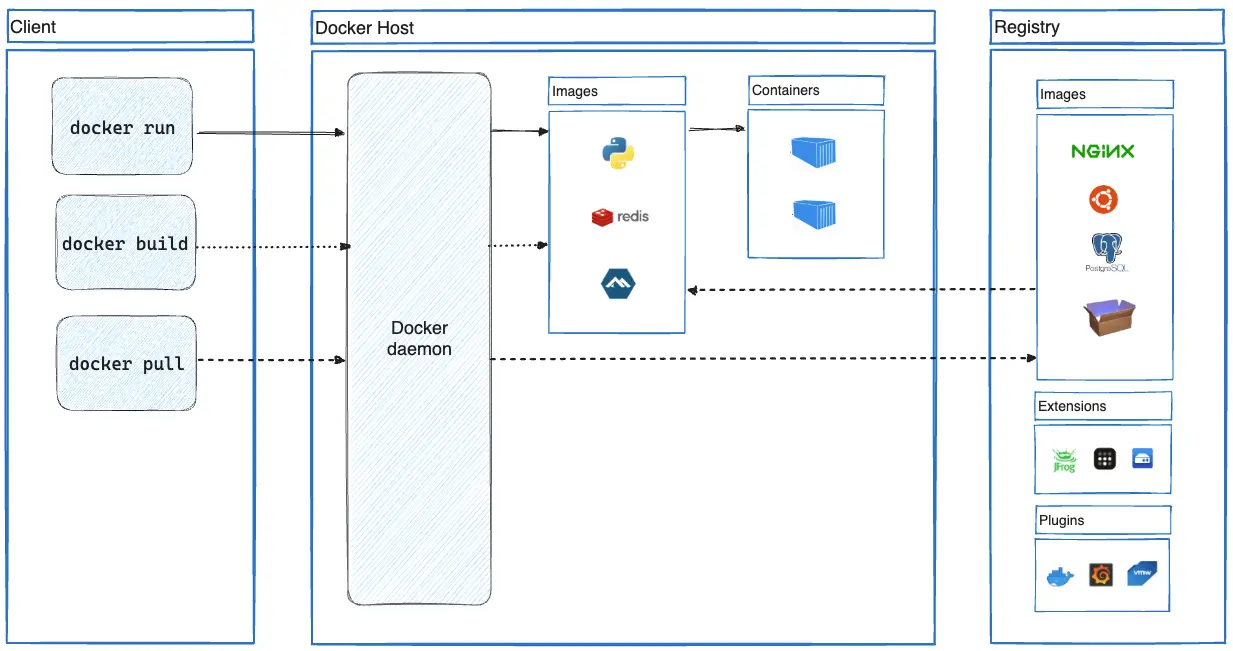
The Docker daemon (dockerd) listens for Docker API requests and manages Docker objects such as images, containers, networks, and volumes. A daemon can also communicate with other daemons to manage Docker services.
The Docker client (docker) is the primary way that many Docker users interact with Docker. When you use commands such as docker run, the client sends these commands to dockerd, which carries them out. The docker command uses the Docker API. The Docker client can communicate with more than one daemon.
Docker Desktop is an easy-to-install application for your Mac, Windows or Linux environment that enables you to build and share containerized applications and microservices. Docker Desktop includes the Docker daemon (dockerd), the Docker client (docker).
What is Container
Imagine a container as a box that holds everything your application needs to run—like the code, libraries, and system tools. This way, your application can run the same way on any machine, regardless of the environment.
What is Images
These are like blueprints for containers. An image contains all the instructions for creating a container. Think of it as a recipe that tells Docker how to build your application’s environment.
For example, you may build an image which is based on the ubuntu image, but installs the Apache web server and your application, as well as the configuration details needed to make your application run.For example, you may build an image which is based on the ubuntu image, but installs the Apache web server and your application, as well as the configuration details needed to make your application run.
Docker registries
A Docker registry stores Docker images. Docker Hub is a public registry that anyone can use, and Docker looks for images on Docker Hub by default. You can even run your own private registry.
When you use the docker pull or docker run commands, Docker pulls the required images from your configured registry. When you use the docker push command, Docker pushes your image to your configured registry.
Tasks
- Use the
docker runcommand to start a new container and interact with it through the command line. [Hint:docker run hello-world]
docker run hello-world

- Use the
docker inspectcommand to view detailed information about a container or image.
The docker inspect command is used to obtain detailed information about Docker objects, such as containers, images, networks, and volumes. It provides a JSON output that includes all the configuration details, metadata, and status information related to the object you are inspecting.
docker inspect <image id or container id>

- Use the
docker portcommand to list the port mappings for a container.
docker run -d -p 80:80 nginx:latest


- Use the
docker statscommand to view resource usage statistics for one or more containers.
docker stats

- Use the
docker topcommand to view the processes running inside a container.
docker top <container id>

- Use the
docker savecommand to save an image to a tar archive.
docker save -o hello.tar hello-world

Follow for more updates:)


